

Industrial PC vs Standard PC: What Are the Key Differences?
Industrial PCs and standard PCs may use similar processors, memory, and storage technologies, but they are designed for very different operating environments. Standard PCs are primarily built for everyday computing in controlled environments such as offices and homes, while industrial PCs are designed for demanding applications where continuous operation, environmental resistance, industrial connectivity, and long-term reliability may be required.
The right choice depends on where the computer will operate, what equipment it needs to communicate with, and the application’s reliability requirements. This guide compares industrial PCs vs standard PCs across durability, temperature, cooling, connectivity, reliability, lifecycle, and industrial applications.
Table Of Contents
- What is an Industrial PC?
- Industrial PC vs Standard PC: Quick Comparison
- Key Differences Between Industrial PCs and Standard PCs
- Types and Applications of Industrial PCs
- Industrial PC vs Standard PC: Which Should You Choose?
- Conclusion
What is an Industrial PC?
An industrial PC, also known as an IPC or industrial computer, is a computing system designed for applications such as factory automation, machine control, SCADA, machine vision, edge computing, data acquisition, and production monitoring.
Unlike standard computers that normally operate in controlled indoor environments, industrial PCs can be configured for demanding conditions involving temperature variations, dust, vibration, electrical interference, or continuous workloads. Depending on the model, they may also provide industrial communication interfaces, fanless cooling, specialized power inputs, expansion options, and longer product availability.
Industrial PC vs Standard PC: Quick Comparison
| Feature | Industrial PC | Standard PC |
|---|---|---|
| Environment | Industrial and demanding environments | Homes and offices |
| Temperature | Wider temperature options available | Controlled temperatures |
| Cooling | Fanless options are common | Fan-based cooling is common |
| Connectivity | Industrial I/O and serial interfaces available | Standard consumer/business interfaces |
| Reliability | Designed for demanding workloads | General-purpose workloads |
| Lifecycle | Longer platform availability may be available | Faster hardware refresh cycles |
| Applications | Automation, SCADA, machine vision, edge computing | Office, browsing and general computing |
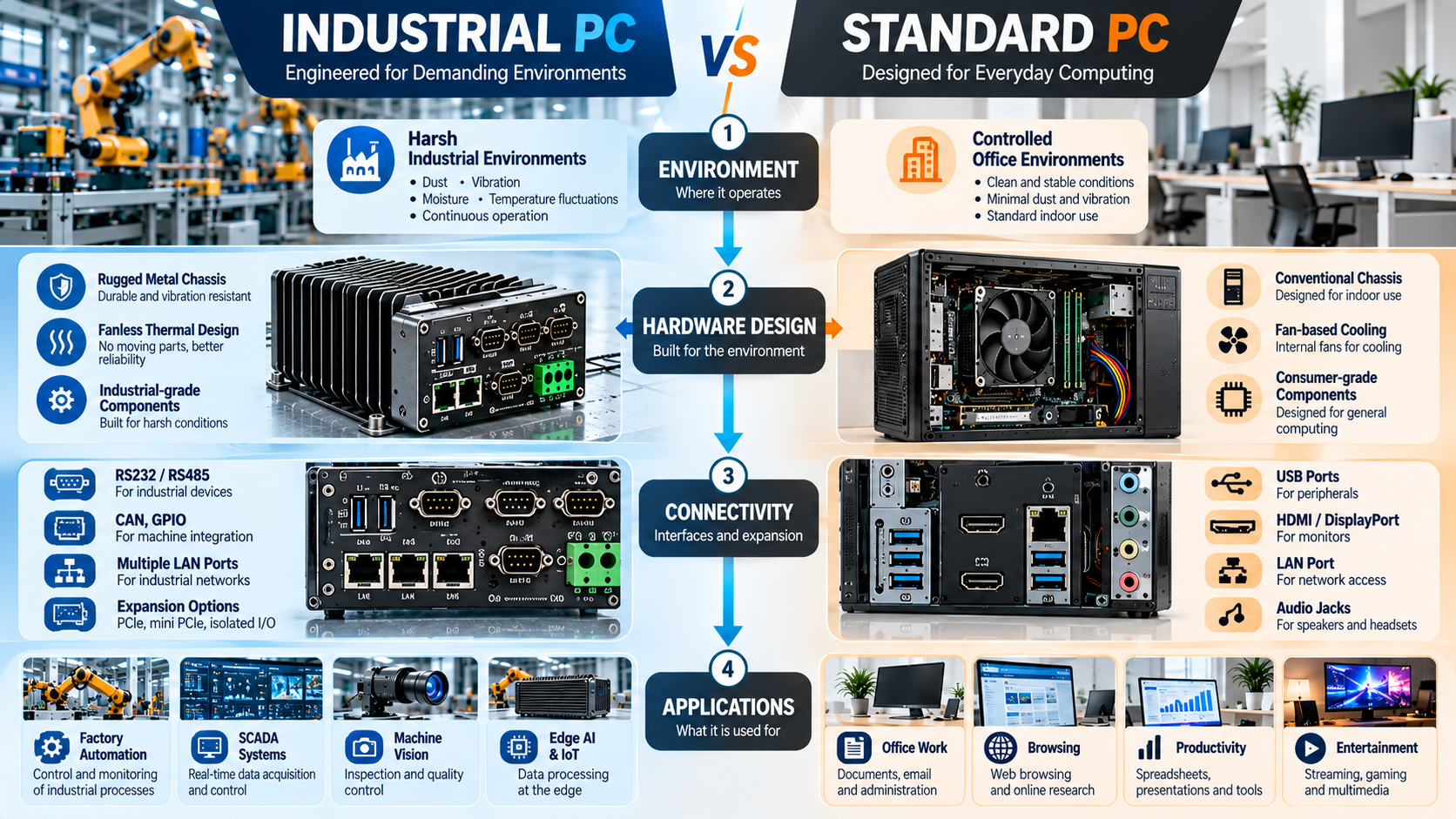
The main difference is therefore not simply processing power. Industrial computers are designed around the operating environment, connectivity requirements, reliability, integration, and lifecycle needs of industrial systems.
Key Differences Between Industrial PCs and Standard PCs
1. Operating Environment and Durability
Standard PCs are primarily designed for controlled environments such as homes, offices, and commercial spaces. Industrial PCs may be installed on factory floors, near machinery, inside control cabinets, or in warehouses where dust, vibration, temperature changes, and other environmental factors can be present.
Depending on the system, industrial computers may use rugged enclosures, vibration-resistant construction, sealed interfaces, or additional environmental protection. The exact protection level should always be verified from the specifications of the selected model.
2. Temperature and Cooling
Standard computers are normally used in climate-controlled environments, while industrial computers can be available with wider operating-temperature specifications.
Many industrial systems also use fanless thermal designs that transfer heat through heat sinks, chassis surfaces, or passive cooling. This can reduce the movement of dust through the computer and remove some moving components.
For a deeper explanation, see our Industrial PC Operating Temperature Range guide.
3. Industrial I/O and Connectivity
Standard PCs generally provide interfaces such as USB, Ethernet, HDMI, and DisplayPort. Industrial computers may include these connections along with interfaces used for automation and control.
Depending on the model, this can include RS-232, RS-422, RS-485, multiple Ethernet ports, GPIO, CAN, USB, and PCIe expansion.
These connections can allow Industrial Computers and Servers to communicate with PLCs, sensors, industrial cameras, machinery, and other automation equipment.
4. Continuous Operation and Reliability
Industrial applications can require computers to perform demanding workloads for extended periods with minimal interruption.Industrial PCs are commonly engineered with thermal management, enclosure design, component selection, and power architectures suited to these environments. Standard computers can also operate for long periods, but they are generally designed around different environmental and deployment requirements.
The current sentence claiming industrial PCs can run “24/7 without the risk of failure” should be removed because no computer can be considered completely free from failure risk.
5. Product Lifecycle and Maintenance
Industrial machinery and production systems can remain in operation for many years. Changing the computing platform may require software validation, integration changes, driver testing, or hardware requalification.
For this reason, industrial computing platforms often place more emphasis on product lifecycle stability and long-term component availability. This can be important for machine builders, system integrators, OEMs, and automation projects where replacing hardware frequently is impractical.
6. Expansion and Industrial Integration
Both standard and industrial PCs can be customized, but industrial computers often provide expansion options specifically designed for industrial integration.
These may include additional serial ports, multiple Ethernet connections, storage options, PCIe expansion, industrial communication interfaces, and specialized mounting configurations.
Such flexibility makes industrial computers suitable for broader Industrial Automation systems involving machinery, controllers, sensors, monitoring software, and other production equipment.
Types and Applications of Industrial PCs
Industrial computers are available in different form factors depending on the application.
Industrial Box PCs are compact systems commonly used for machine control, factory automation, edge computing, data acquisition, and industrial communication.
Industrial Panel PCs combine computing hardware with a display or touchscreen and are commonly installed on machines, production lines, operator stations, and control panels.
Rackmount industrial computers are useful where greater expansion, storage, processing capability, or centralized installation is required.
Across these form factors, industrial PCs can support applications such as SCADA and HMI systems, factory automation, machine vision, quality inspection, logistics, production monitoring, edge AI, and data acquisition.
Your existing Panel PC image can be moved into this section rather than keeping it above “Purpose and Design.”
Conclusion
Industrial PCs and standard PCs can use similar computing technologies, but they are designed for different deployment requirements. Standard PCs are suitable for general-purpose computing in controlled environments, while industrial computers can provide specialized connectivity, rugged design, wider environmental capabilities, and longer lifecycle options.
For automation, SCADA, machine vision, edge computing, and other demanding applications, the system should be selected according to the environment, connectivity, workload, and lifecycle requirements. Explore ITG India’s Industrial Computers and Servers for available industrial computing solutions.
This version keeps the article within the 1,000-1,400 word range, removes the repetitive Panel PC emphasis, keeps useful internal links, and targets the actual Industrial PC vs Standard PC comparison intent more directly.
Industrial PC vs Standard PC: Which Should You Choose?
A standard PC may be sufficient when the computer operates in a clean, temperature-controlled environment and only requires conventional computing and connectivity.
An industrial PC should be considered when the application involves temperature variation, dust, vibration, industrial communication interfaces, machine integration, long-running workloads, or longer platform lifecycle requirements.
In simple terms, choose a standard PC for general computing in controlled environments. Consider an industrial PC when the computer becomes part of a machine, production line, automation system, SCADA environment, inspection system, or other demanding industrial application.

