

Industrial PC Operating Temperature: How to Choose the Right System
Industrial computers are designed to operate reliably in environments where standard PCs may struggle. Temperature conditions in industrial deployments can vary significantly depending on location, equipment, and enclosure design.
When you deploy an industrial PC or gateway in India, temperature is often the “silent killer” behind unexpected downtime. From 48°C summer afternoons in Rajasthan to sub‑zero nights in the Himalayas, your hardware is constantly tested by the environment it operates in. Choosing the right operating temperature range is therefore just as important as choosing CPU performance, memory, or I/O ports.
This guide explains what operating temperature really means, how it differs from storage temperature, the most common industrial temperature bands (0-40°C, 0-60°C, -20-60°C, -25-70°C, -40-70°C), and how to choose the right range for Indian conditions. We also highlight example Advantech/AAEON solutions distributed by ITG India, including the ECU‑1051 gateway, WISE‑4210 remote I/O, BOXER‑6643‑TGU box PC, and ACP industrial chassis series.
Table Of Contents
- What is Operating Temperature (and how is it different from Storage Temperature)?
- Common Industrial Operating Temperature Ranges
- Why do these ranges matter so much in India?
- Hot and Dry Regions: Rajasthan, Central India, and Industrial Belts
- Hot and Humid Regions: Coastal Cities and Process Plants
- Cold and High Altitude Regions: Himalayan States and Refrigerated Environments
- Which Temperature Range Do You Really Need? (Decision Guide)
- 0–40°C: Office and Controlled Rooms
- 0–50/60°C: Indoor Factories and Warehouses
- -20–60°C: Harsh Indoor and Moderate Outdoor Environments
- -25–70°C: Outdoor Field I/O and LPWAN Devices
- -40–70°C: Extreme Outdoor, Energy, and Transport Applications
- How Design Choices Make Wide-Temperature Operation Possible
- Choosing the Right Temperature Range for Your Deployment
What is operating temperature (and how is it different from storage temperature)?
Every industrial device is designed to run reliably only within a specified functional temperature range. This is the ambient temperature range in which the unit can be powered on, perform its functions, and meet its rated specifications without thermal throttling, unexpected resets, or premature component failure.
In contrast, storage temperature covers the range in which the device can be stored when powered off. Storage ranges are usually wider, because components can tolerate more extreme temperatures when they are not actively switching, passing current, or generating additional heat.
A few key points for industrial buyers:
- It is measured at the device’s environment, not at the hottest internal component.
- Internal components like CPUs, memory, and SSDs typically run 20-30°C hotter than ambient, hence why design and airflow are critical.
- Going beyond safe temperature range for long periods can cause issues like data corruption, signal errors on serial or Ethernet ports, and unexpected restarts.
On industrial products, you will typically see both values listed. For example, the Advantech ECU‑1051 industrial IoT gateway is rated for temp range of -40°C to 70°C and storage temperatures of -40°C to 85°C. The WISE‑4210 LPWAN remote I/O family operates from -25°C to 70°C and can be stored from -40°C to 85°C. The AAEON BOXER‑6643‑TGU box PC specifies -20°C to 60°C operating (with 0.5 m/s airflow) and -40°C to 80°C storage. By comparison, the Advantech ACP‑2010 industrial chassis supports a more standard 0°C to 40°C operating and -20°C to 60°C non‑operating range.
Common Industrial Operating Temperature Ranges
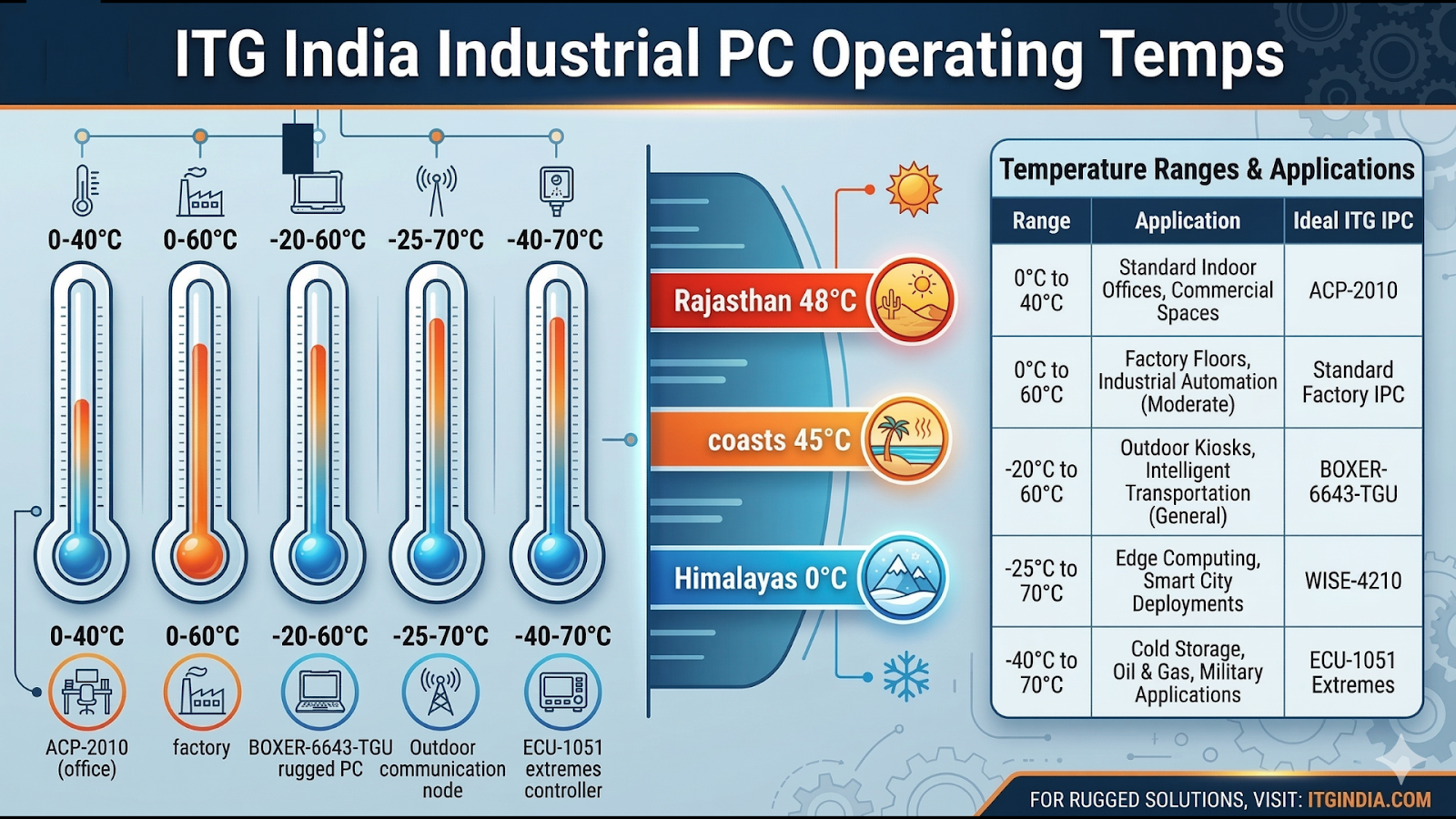
Industrial computer manufacturers typically classify systems into several temperature bands depending on their intended environments.
| Temperature Range | Typical Applications | Example Systems |
|---|---|---|
| 0°C to 40°C | Office environments and climate-controlled rooms | Industrial rack chassis like ACP-2010 |
| 0°C to 60°C | Indoor factory environments and control cabinets | Standard industrial PCs and panel PCs |
| -20°C to 60°C | Harsh indoor environments or semi-outdoor deployments | AAEON BOXER-6643-TGU industrial PC |
| -25°C to 70°C | Outdoor field I/O, sensor networks, remote monitoring | Advantech WISE-4210 LPWAN I/O |
| -40°C to 70°C | Extreme outdoor environments, energy and transportation | Advantech ECU-1051 industrial gateway |
These classifications help system integrators determine the level of ruggedness required for specific deployments.
Why do these ranges matter so much in India?
India’s geography and industrial landscape create some of the world’s toughest operating conditions for electronics. You have to consider not just the nominal air temperature, but also direct sun, enclosure design, power quality, dust, and humidity.
Hot and dry: Rajasthan, central India, and industrial belts
In many regions, ambient temperatures of 45-48°C in summer are common, especially around open factory sheds, rooftop installations, and outdoor kiosks. If a panel PC is placed inside a metal cabinet exposed to direct sun, internal ambient can easily exceed the outdoor temperature by 10-15°C. Internal components can then run another 20-30°C hotter, pushing standard 0-60°C designs over their safe limits.
In these conditions, you should strongly consider:
- At least a -20°C to 60°C rated box PC like the BOXER‑6643‑TGU, along with proper ventilation or heat‑conductive mounting to the cabinet.
- For outdoor gateways, a -40°C to 70°C rating such as the ECU‑1051, especially for solar plants, substations, and roadside cabinets where there is no active cooling.
Hot and humid: Coastal cities and process plants
In coastal regions like Mumbai, Chennai, and Visakhapatnam, high humidity and salt can accelerate corrosion and affect connectors, cooling effectiveness, and PCB reliability. Here, the ambient temps often stays in the 35-45°C band, but high humidity means you should pick:
- Devices that specify both temperature and humidity ranges (e.g., ECU‑1051 with 5-95% RH non‑condensing, WISE‑4210 with 10-95% RH).
- Enclosures and mounting that reduce condensation risk and allow ventilation.
In many coastal indoor factories, a 0-60°C standard industrial PC can be sufficient if mounted away from direct sun and heat sources, but long‑term reliability will still benefit from extended or wide‑temp designs.
Cold and high altitude: Himalayan states and refrigerated environments
In cold storage, refrigerated warehouses, or high‑altitude deployments (e.g., hydropower sites, telecom shelters in hill states), the challenge shifts to low‑temperature starts. Standard 0°C‑rated devices may fail to boot or experience mechanical issues in drives or displays.
In these cases:
- Wide‑temp devices with -25°C or -40°C lower limits (WISE‑4210, ECU‑1051) are a better match.
- For panel PCs or industrial computers, look for designs that maintain display performance and touch response at sub‑zero ambient temperatures.
Which temperature range do you really need? (Decision guide)
To simplify selection, you can think in terms of environment + enclosure + exposure. Use the following practical guide as a starting point, then verify against your actual site conditions.
1. 0-40°C: Office and controlled rooms
Choose 0-40°C if:
- The system is installed in an air‑conditioned control room or server room.
- Ambient stays between roughly 18°C and 30°C year‑round.
- There is no direct sun on the cabinet or device.
Typical examples:
- ACP‑2010 / ACP‑2320 chassis in standard racks or cabinets.
- Industrial PCs used for SCADA, MES, or IT workloads in controlled environments.
2. 0-50/60°C: Indoor factories and warehouses
Choose 0-50°C or 0-60°C if:
- The device is inside a building with some ventilation, but not tightly air‑conditioned.
- Ambient typically ranges from 10-45°C, with occasional peaks approaching 50°C.
- The cabinet is shaded and not directly exposed to sunlight.
This range suits many panel PCs and industrial PCs on the factory floor, provided you design the enclosure with some airflow or forced ventilation.
3. -20-60°C: Harsh indoor and moderate outdoor environments
Choose -20°C to 60°C if:
- The equipment is in a non‑AC shop floor, outdoor but shaded area, or semi‑outdoor application.
- There is possible exposure to cold winter nights around 0°C or below, and hot summer days to 50°C.
- Cabinet temperature may exceed ambient by 10-15°C.
An example is the AAEON BOXER‑6643‑TGU industrial box PC, specified for -20°C to 60°C with 0.5 m/s airflow and designed with wide‑temperature SSD/RAM options. This makes it suitable for many machine‑side, edge computing, and visual inspection tasks in Indian factories.
4. -25-70°C: Outdoor field I/O and LPWAN devices
Choose -25°C to 70°C if:
- Devices sit in small field enclosures, junction boxes, or poles with limited thermal management.
- There is exposure to direct sun and the ambient can vary from below freezing to extreme summer heat.
- The node is part of a remote monitoring, LPWAN, or telemetry system.
The WISE‑4210 series is a good example. It offers temperature range from -25°C to 70°C, storage from -40°C to 85°C, and 10-95% RH humidity tolerance, making it well‑suited for remote sensors, energy monitoring, and distributed I/O.
5. -40-70°C: Extreme outdoor, energy, and transport applications
Choose -40°C to 70°C if:
- You deploy equipment in roadside cabinets, solar farms, wind turbines, or railway and power substation environments.
- There is little or no active cooling, and both hot and cold extremes are possible.
- System availability is critical and site visits are difficult or expensive.
The Advantech ECU‑1051 industrial gateway is engineered for these conditions, with -40°C to 70°C operating, -40°C to 85°C storage, and 5-95% RH humidity. It is commonly used for solar power, smart factory connectivity, and cloud‑based applications where the gateway sits close to field equipment rather than in a control room.
How design choices make wide-temperature operation possible
Achieving wide‑temperature ranges is not only about using a rugged enclosure. It requires a holistic design approach at both the component and system levels.
Key enablers include:
- Wide‑temperature components: RAM, SSDs, power supplies, and communication modules individually rated from -40°C to 85°C or similar.
- Thermal design: Heat sinks, heat pipes, and fanless chassis are carefully engineered so that critical components remain within their safe temperature even at high ambient.
- Mechanical robustness: Vibration and shock ratings (e.g., 2 Grms vibration, 50G shock for BOXER‑6643‑TGU) ensure performance under harsh industrial conditions.
- Environmental sealing: IP ratings, gasketed doors, and conformal coating help manage dust, moisture, and condensation.
When comparing products, it is worth looking at all of these factors alongside the temperature number itself. For example, the BOXER‑6643‑TGU’s -20-60°C rating is explicitly tied to an airflow condition and the use of industrial wide‑temp SSD/RAM modules. Similarly, the ECU‑1051 and WISE‑4210 specify their humidity limits in addition to temperature, which is important in Indian coastal and monsoon environments.
Choosing the Right Temperature Range for Your Deployment
Selecting the right industrial PC or gateway for Indian deployments starts with an honest assessment of your real ambient conditions, not just the weather forecast for the nearest city. Once you know your expected minimum and maximum temperatures, enclosure type, and exposure to sun and humidity, you can choose an appropriate range:
- 0-40°C and 0-60°C for truly climate‑controlled spaces.
- -20-60°C for harsh indoor or semi‑outdoor environments.
- -25-70°C and -40-70°C for outdoor, field, and mission‑critical infrastructure.
ITG India’s portfolio covers all of these bands with proven Advantech and AAEON products like the ACP chassis, BOXER‑6643‑TGU, WISE‑4210, and ECU‑1051, backed by local engineering support and integration expertise. By aligning your temperature requirements with the right class of hardware, you can significantly improve system uptime, reduce maintenance visits, and protect your automation investments across India’s diverse climates.

