
Windows 11 IoT Enterprise vs Windows 11 Pro: Which Is Better for Industrial PCs?
Choosing an operating system for an industrial computer is different from selecting Windows for an office desktop. A computer running production monitoring, machine control interfaces or warehouse automation may need to operate reliably for years without major software changes.
Two common options are Windows 11 IoT Enterprise and Windows 11 Pro. Both support familiar Windows applications, but they differ in update management, device restrictions, licensing and long-term deployment planning.
So which one should you choose?
For dedicated industrial systems requiring a stable operating environment, Windows 11 IoT Enterprise LTSC is often the more suitable option. Windows 11 Pro can be a practical choice for engineering workstations and general-purpose industrial computers.
Understanding these differences helps manufacturers and system integrators select the right operating system for their industrial computers and servers.
Table of Contents
- What Is Windows 11 IoT Enterprise?
- What Is Windows 11 Pro?
- Windows 11 IoT Enterprise vs Windows 11 Pro: Key Differences
- Why Operating System Stability Matters in Industrial Automation
- Which Windows Version Is Best for Different Industrial Applications?
- Five Things to Check Before Choosing an Industrial PC Operating System
- Windows 11 IoT Enterprise vs Pro: Which Should You Choose?
- Frequently Asked Questions
What Is Windows 11 IoT Enterprise?
Windows 11 IoT Enterprise is a Windows operating system designed for fixed-purpose devices such as industrial controllers, kiosks, medical systems and automation equipment.
It provides enterprise-level security, device management and customisation capabilities while supporting familiar Windows applications.
There are two important servicing options:
- Windows 11 IoT Enterprise: Uses the General Availability Channel (GAC), with regular feature updates.
- Windows 11 IoT Enterprise LTSC: Uses the Long-Term Servicing Channel, designed to maintain a consistent feature baseline over an extended period.
Windows 11 IoT Enterprise LTSC 2024 has a ten-year servicing lifecycle, ending in October 2034. Security and quality updates continue, but new feature releases are not automatically installed.
This makes LTSC particularly relevant for industrial applications where system changes require careful testing.
What Is Windows 11 Pro?
Windows 11 Pro is designed for business computers, engineering workstations and general-purpose professional applications.
It supports features such as BitLocker encryption, Remote Desktop, domain connectivity and business device management.
For industrial environments, Windows 11 Pro can run compatible HMI applications, SCADA software, engineering tools and monitoring platforms.
However, its standard servicing model includes periodic feature updates. Organisations can control update deployment through appropriate management policies, but they must plan for ongoing Windows version changes.
For example, an engineering workstation used for PLC programming and documentation may benefit from Windows 11 Pro’s familiar desktop experience.
Windows 11 IoT Enterprise vs Windows 11 Pro: Key Differences
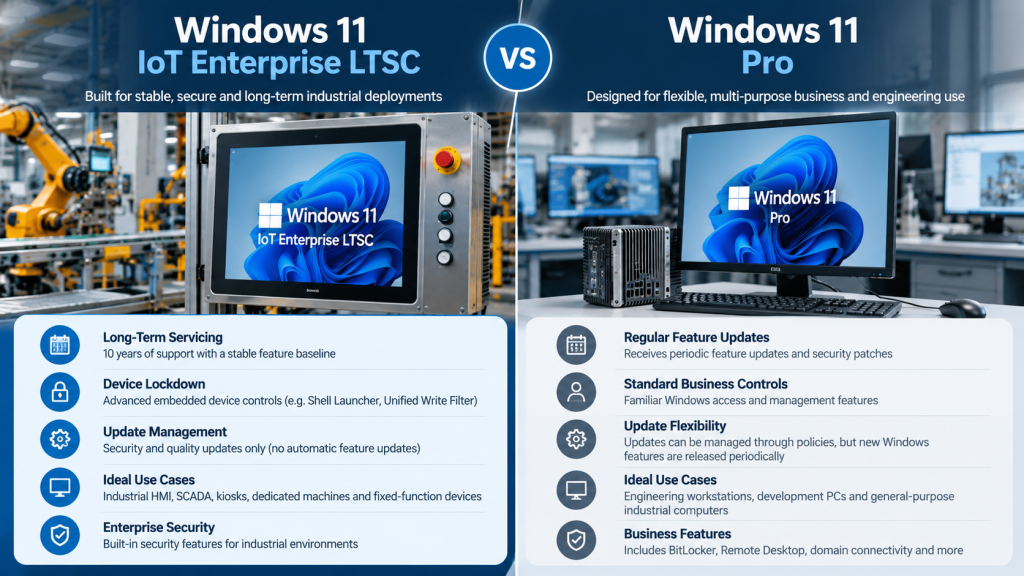
| Feature | Windows 11 IoT Enterprise LTSC | Windows 11 Pro |
|---|---|---|
| Primary use | Dedicated, fixed-function devices | General-purpose business PCs |
| Feature updates | No automatic new feature releases | Periodic feature updates |
| Security updates | Monthly servicing | Regular security updates |
| Support lifecycle | 10 years per LTSC release | Version-dependent |
| Device lockdown | Advanced embedded-device controls | Standard business controls |
| Application compatibility | Windows apps, subject to LTSC support | Broad desktop application support |
| Licensing | Specialised OEM/enterprise channels | Standard business PC licensing |
| Best suited for | Industrial HMI, kiosks, dedicated systems | Engineering and multipurpose workstations |
Microsoft confirms that IoT Enterprise offers additional lockdown capabilities, including Unified Write Filter and Shell Launcher.
Why Operating System Stability Matters in Industrial Automation
1. Long-Term Software Support
Industrial equipment often remains operational longer than ordinary office computers.
Windows 11 IoT Enterprise LTSC provides a fixed software baseline and extended servicing, helping organisations maintain validated configurations.
This is valuable when an HMI application, device driver or machine interface must remain compatible throughout a lengthy deployment.
However, ten-year Windows servicing does not guarantee ten-year hardware availability or application support.
2. Control Over Updates
An unexpected restart during production can disrupt operations.
Windows 11 Pro provides update-management options, but administrators must maintain policies and supported versions.
IoT Enterprise LTSC avoids automatic feature upgrades, making it easier to preserve application compatibility.
Important: LTSC still receives security and quality updates. Businesses should schedule maintenance windows, test updates and configure restart behaviour appropriately.
3. Security and Restricted Access
Industrial PCs frequently operate in shared environments where employees should access only authorised applications.
Windows 11 IoT Enterprise supports features such as Shell Launcher and Unified Write Filter.
Shell Launcher can replace the standard Windows shell with a dedicated industrial application. Unified Write Filter can protect selected storage volumes from persistent changes.
These capabilities help support controlled operator stations, although correct configuration and regular security maintenance remain essential.
Which Windows Version Is Best for Different Industrial Applications?
The ideal choice depends on the computer’s actual role.
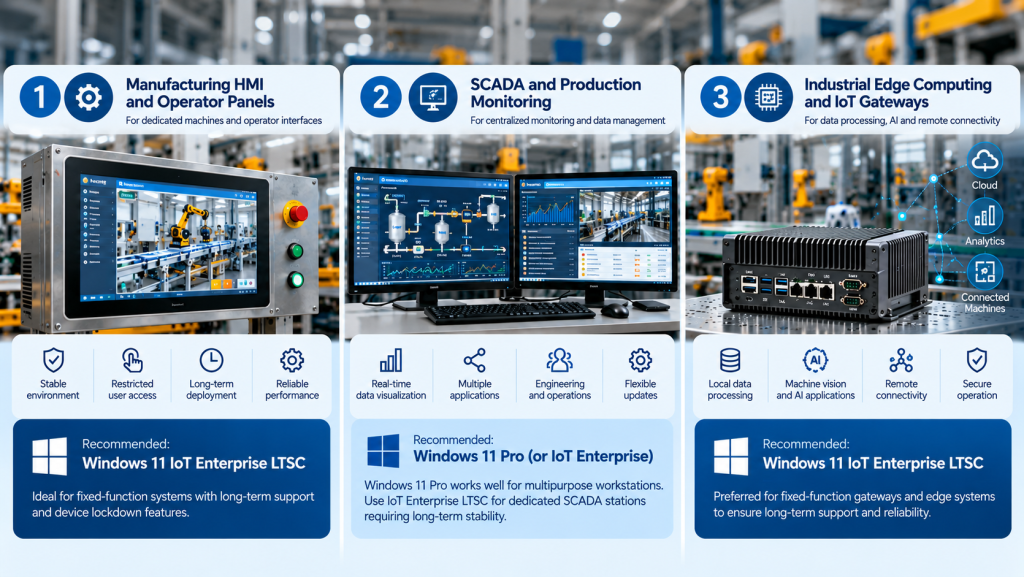
Manufacturing HMI and Operator Panels
An operator panel may run the same HMI application continuously, with limited access to other software.
Windows 11 IoT Enterprise LTSC is often suitable because it provides long-term servicing and device lockdown features.
For these deployments, ITG India’s industrial panel computers offer a relevant hardware category to evaluate.
SCADA and Production Monitoring
SCADA workstations collect equipment data, display alarms and provide operational visibility.
A dedicated operator station may benefit from IoT Enterprise LTSC, while a multipurpose engineering workstation may be better suited to Windows 11 Pro.
Both choices require compatibility checks with the SCADA vendor, database components and industrial communication drivers.
Industrial Edge Computing
Edge computers can process equipment data locally before transferring selected information to central systems.
A fixed-function gateway or edge application may favour IoT Enterprise LTSC.
A development computer frequently receiving new tools and application features may favour Windows 11 Pro.
Explore ITG India’s industrial fanless Box PCs and gateways when evaluating suitable hardware.
Five Things to Check Before Choosing an Industrial PC Operating System
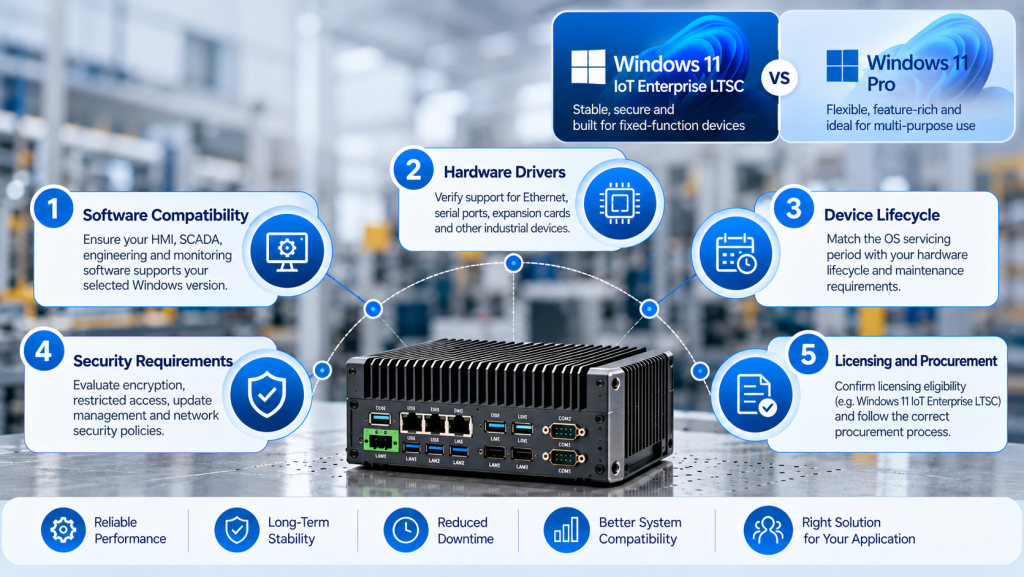
The operating system must work with the complete industrial computing environment.
- Software compatibility: Confirm HMI, SCADA, monitoring and engineering software support the selected Windows edition.
- Hardware drivers: Verify support for Ethernet controllers, serial interfaces, expansion cards and specialised devices.
- Device lifecycle: Match operating system servicing with expected hardware availability and maintenance requirements.
- Security requirements: Evaluate encryption, restricted access, remote management and industrial network policies.
- Licensing: Confirm the device qualifies for Windows IoT licensing and identify the authorised procurement route.
For additional hardware-selection guidance, read ITG India’s complete guide to embedded computers.
One common mistake is selecting LTSC solely because it offers longer support. If essential software requires newer Windows features, the standard servicing channel may be more appropriate.
Windows 11 IoT Enterprise vs Pro: Which Should You Choose?
Choose Windows 11 IoT Enterprise LTSC when your industrial PC performs a dedicated function, requires restricted user access or must maintain a stable operating system configuration for many years.
Choose Windows 11 Pro when the computer supports multiple engineering applications, regular software upgrades and general-purpose business tasks.
For Indian manufacturers and system integrators, the decision should also account for local technical support, replacement hardware, driver availability and deployment costs.
ITG India offers industrial computing solutions for automation and embedded applications. To discuss suitable hardware configurations and operating system requirements, contact ITG India’s technical and sales team.

